
CTU — Count Up
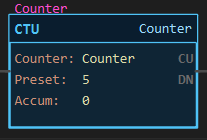
Description
Section titled “Description”CTU (Count Up) adds one to its accumulator each time its rung goes from false to true. It counts the transition, not the scan: a rung held true counts once, however many scans it stays true. When the accumulator reaches the preset the DN bit sets, and the count keeps going past the preset until a RES instruction clears it. Use CTU to count events: parts past a sensor, cycles of a machine, presses of a button, pulses from a timer. Do not put an ONS in front of a CTU; the counter already detects the edge. Do not use CTU to measure time; that is a timer.
Operands
Section titled “Operands”| Operand | Type | Format | Valid Range | Required | Description |
|---|---|---|---|---|---|
| Counter | COUNTER | Tag name or Array[n] |
A COUNTER tag; a CTU and a CTD may share one | Yes | The structure that holds this counter’s preset, accumulator and status bits. |
| Preset | DINT | Whole number | −2,147,483,648 to 2,147,483,647 | Yes | The count at which DN sets. Stored in the tag as .PRE; editable online. |
| Accum | DINT | Whole number | Read-only on the face | — | The current count, .ACC. Retained until RES. |
Scan Behavior
Section titled “Scan Behavior”Prescan
Section titled “Prescan”CU is cleared. ACC, DN, OV and UN keep their values: a counter is retentive.
Rung-condition-in is false
Section titled “Rung-condition-in is false”CU clears. Nothing else changes; the count is held.
Rung-condition-in is true
Section titled “Rung-condition-in is true”If the rung was false on the previous scan, this is a rising edge: ACC increases by one. CU sets. DN is then set if ACC is greater than or equal to PRE, otherwise cleared. If ACC was already at the DINT maximum it wraps to the DINT minimum and OV sets. If the rung was already true last scan, nothing happens.
Postscan
Section titled “Postscan”Nothing special.
Member Bits
Section titled “Member Bits”| Member | Type | Set when | Cleared when |
|---|---|---|---|
.CU |
BOOL | The rung is true | The rung is false |
.CD |
BOOL | A CTD on the same counter has a true rung | That CTD’s rung is false |
.DN |
BOOL | ACC is greater than or equal to PRE | ACC drops below PRE (a CTD, or RES) |
.OV |
BOOL | ACC wraps from +2,147,483,647 to −2,147,483,648 | RES only |
.UN |
BOOL | A CTD on the same counter wraps the other way | RES only |
.PRE |
DINT | The preset | — |
.ACC |
DINT | The count; keeps counting past PRE | RES only |
Example
Section titled “Example”Scenario: A machine builds parts in batches of five. Every completed cycle counts one up. A part that fails inspection is pulled from the batch and must come back off the count, which a CTD on the same counter does (see the CTD page). A lamp lights when five good parts are done.
Tags:
Cycle_Complete— Cycle complete, BOOL (true at the end of each machine cycle)Inspect_Fail— Inspection failed, BOOL (true while a rejected part is in the station)Counter— COUNTER, Preset 5BatchDone— Batch complete lamp, BOOLAck— Operator acknowledge, BOOL
Rung 1 (parts made):
—|XIC Cycle_Complete|———[CTU Counter Preset 5]———Rung 2 (parts rejected, explained on the CTD page):
—|XIO Inspect_Fail|———[CTD Counter Preset 5]———Rung 3 (the lamp):
—|XIC Counter.DN|———(OTE BatchDone)———Rung 4 (the reset):
—|XIC Ack|———(RES Counter)———Each time Cycle_Complete goes true the counter’s rung sees a rising edge and the Accum climbs by one; holding Cycle_Complete true does not count again. CU lights while the rung is true. The screenshot below was taken after the first cycle, with the rung still held: Accum 1, CU lit, DN dark.

At five, DN lights and BatchDone turns on. The count does not stop at the preset: a sixth cycle takes the Accum to 6 with DN still lit.
Press Ack: RES clears the Accum to 0 and DN to 0, the lamp goes out, and the next batch counts up from zero.
See Also
Section titled “See Also”- CTD — Count Down (the same counter, counting the other way)
- RES — Reset (the only way to clear a counter)
- TP — Pulse Timer (a self-retriggering TP makes a handy pulse source for counting)
- ONS — One-Shot Rising (not needed in front of a CTU)
- Timer and Counter Instructions — Category index
The count runs past the preset. Unlike a timer, a counter does not stop at PRE. DN stays on while ACC is at or above it. Reset the counter when the event it counted has been handled, or the count keeps growing: XIC CTU.DN → RES CTU on its own rung is the classic self-resetting batch counter.
Overflow does not fault. At the DINT maximum the accumulator wraps to the minimum and OV sets; counting continues and the scan is never stopped. OV stays set until RES. This is the Logix behaviour; on an SLC 500 the wrap happened at 32,767.
Negative presets. The compare is signed. A CTU with a preset below zero has DN on from the moment it is reset, since an Accum of 0 is already at or above the preset, and every count up keeps it there. That is rarely what you want from a CTU; it matters mostly when a CTU shares a counter with a CTD that is counting down to a negative target (see the CTD page).
Up and down on one counter. A CTU and a CTD may name the same COUNTER tag. They share ACC, PRE and DN; CU belongs to the CTU and CD to the CTD. Use the pair to track a quantity that both rises and falls, such as parts in a buffer.
RES clears everything but the edge memory. ACC, DN, OV and UN go to 0. The counter remembers that its rung was true, so a rung still held across the reset does not count again until it has gone false and true once more.
Counter arrays. The Counter operand may be an element of a COUNTER array, for example Counts[2].
Applies to LadderIDE >=1.2.2 · Last reviewed 2026-09-10 · Screenshots verified 2026-09-10