
JSR — Jump to Subroutine
Description
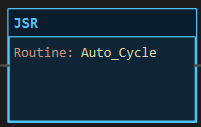
Section titled “Description”JSR (Jump to Subroutine) scans another ladder routine of the project when its rung is true. The called routine’s rungs run in order, top to bottom, at the point of the JSR, and the scan then continues with the rung after the JSR. Main scans every cycle on its own; every other routine runs only when a JSR reaches it. Use JSR to split a program into routines, one per machine section or operating mode, and to run a whole block of logic only while a mode is selected. Do not use JSR to switch outputs off: a routine that stops being called is simply not scanned, so its outputs keep whatever value they last had. LadderIDE’s JSR carries no parameters and needs no SBR or RET in the routine; the routine runs to its last rung and returns. Logic that needs parameters belongs in an MBS (Method Bound Struct).
Operands
Section titled “Operands”| Operand | Type | Format | Valid Range | Required | Description |
|---|---|---|---|---|---|
| Routine | Routine name | Picked from a dropdown | Any ladder or text routine of the project other than Main |
Yes | The routine to scan while the rung is true. The dialog lists the project’s routines; nothing is typed. A JSR with no routine, or one naming a routine that has been deleted, is a build error. |
JSR owns no tag and takes no arguments. Data passes between routines through ordinary program tags, which every routine can read and write.
Scan Behavior
Section titled “Scan Behavior”Prescan
Section titled “Prescan”Nothing. A routine that has never been called has never run, so its outputs sit at their power-up values.
Rung-condition-in is false
Section titled “Rung-condition-in is false”The routine is not scanned this cycle. Nothing in it is updated:
- An OTE in the routine keeps its last value. It does not go false.
- A timer that was timing keeps measuring wall-clock time. When the routine is next called its accumulator jumps to the elapsed time, and its DN bit may set on that first scan.
- A counter, sequencer, shift or FIFO keeps its edge memory. If its rung is true when the routine is next called and was false when the routine was last scanned, it acts once on that scan.
- Any JSR inside the routine is not reached either, so routines it calls are not scanned.
Rung-condition-in is true
Section titled “Rung-condition-in is true”The routine’s rungs are scanned in order, exactly as Main’s are, with any JSR inside them followed the same way. When its last rung has run, the scan returns to the rung after this JSR. A text routine’s code runs once in the same place.
Postscan
Section titled “Postscan”Nothing.
| Rung condition | Routine scanned this cycle | Outputs in the routine |
|---|---|---|
| False | No | Hold their last values |
| True | Yes, at the point of the JSR | Driven by their own rungs |
Example
Section titled “Example”Scenario: A conveyor’s automatic logic lives in its own routine, Auto_Cycle. Main calls it only while the Auto mode selector is on. In Hand mode the routine is skipped and the conveyor is driven from elsewhere.
Tags:
Auto_Mode— Auto mode selected, BOOLStart_Btn— Start pushbutton, BOOLConveyor— Conveyor run output, BOOL
Main, rung 1:
—|XIC Auto_Mode|———[JSR Auto_Cycle]———Auto_Cycle, rung 0:
—|XIC Start_Btn|———(OTE Conveyor)———Scan 1 — Auto_Mode = 0. The rung is false, the JSR is not reached and Auto_Cycle is not scanned. Conveyor stays at 0.

Scan 2 — Auto_Mode = 1. The rung is true and Auto_Cycle scans at this point in the cycle.

Inside Auto_Cycle on the same scan — Start_Btn = 1. Open the routine’s tab, next to Main: its rung is true and Conveyor = 1. A routine’s tab paints its live state like any other while the simulator or Online monitor runs.

Then Auto_Mode goes back to 0. Auto_Cycle is no longer scanned and Conveyor stays at 1, even after Start_Btn is released. It goes to 0 only on the next scan in which Auto_Mode is on and Start_Btn is off. If the conveyor must stop when Auto mode is left, put XIC Auto_Mode in series on the output rung inside the routine, or drive the physical output from a rung in Main that the routine only requests.
See Also
Section titled “See Also”- AFI — Always False Instruction (take one rung out of service)
- OTE — Output Energize (holds its last value in a routine that is not called)
- TON — Timer On Delay (times on the wall clock, called or not)
- MBS — Method Bound Struct (reusable logic with parameters and its own state)
- Program Control Instructions — Category index
Where JSR sits. JSR is an output instruction. Place it at the right end of the rung, on the main line; it is not allowed inside a parallel branch. Conditions go to its left as for any output. A JSR with nothing to its left calls its routine every scan, which is how a routine that must always run is normally included.
Main cannot be called. Main is the routine the controller scans on its own, every cycle. A JSR may target any other routine.
Do not build a call loop. A routine must not call itself, directly or through another routine. The build reports a JSR call cycle as an error and names the routines in it.
Call each routine from one place. Two JSRs to the same routine scan it twice per cycle on the controller. Nothing breaks, because edge memory is updated by the first call, but the second call is wasted scan time and makes the program harder to follow. Gate one JSR with the OR of the conditions instead.
A routine keeps its state while it is not called. This is what makes JSR safe for mode logic and dangerous as an off switch. Anything the routine last wrote stays written. Reset what needs resetting from a rung that always scans.
Not allowed in an MBS body. A block’s logic may not reach outside itself, so JSR is refused inside an MBS body.
No SBR, RET or parameters. Older platforms mark a subroutine’s entry with SBR and its exit with RET and pass values through them. LadderIDE has neither: a routine is a named list of rungs, and tags are program-wide.
Applies to LadderIDE >=1.2.2 · Last reviewed 2026-09-11 · Screenshots verified 2026-09-11