
NOT — Bitwise NOT
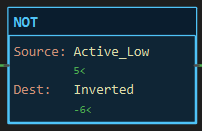
Description
Section titled “Description”NOT (Bitwise NOT) writes to Dest the complement of Source: every 1 becomes 0 and every 0 becomes 1, across the full width of Dest. It is an output instruction with no state and no status bits. Use NOT to invert an active-low input word, to build the inverse of a mask for a following AND, or to flip a whole output word. Do not confuse NOT with NEG; NOT of 5 is −6, NEG of 5 is −5. And do not use NOT to invert a rung condition; XIO does that for one bit.
Operands
Section titled “Operands”| Operand | Type | Format | Valid Range | Required | Description |
|---|---|---|---|---|---|
| Source | A whole-number tag, member, element or bit, or a literal | Tag, Tag.Member, Tag[n], Tag.bit, a number |
Any resolvable reference | Yes | The word to invert. |
| Dest | A writable whole-number tag, member or element | Tag, Tag.Member, Tag[n] |
SINT, INT or DINT; not a literal, not an input pin | Yes | Where the complement is written. |
Width and sign. The complement covers every bit of Dest, sign bit included, so the result of NOT on a positive number is negative: NOT 5 in an INT is −6, in a DINT also −6, because the same rule NOT x = −x − 1 holds at any width. To invert only the low bits, follow NOT with an AND against a mask.
Scan Behavior
Section titled “Scan Behavior”Prescan
Section titled “Prescan”Nothing. Dest keeps its power-up value.
Rung-condition-in is false
Section titled “Rung-condition-in is false”The instruction does nothing. Dest holds its last value.
Rung-condition-in is true
Section titled “Rung-condition-in is true”Source is read, complemented, and the result is written to Dest every scan the rung is true.
Postscan
Section titled “Postscan”Nothing.
Example
Section titled “Example”Scenario: An input expander reports its eight inputs active-low: a bit reads 0 when the switch is closed. The word is inverted so that 1 means closed, as every other input in the program does.
Tags:
Invert— Invert the word, BOOLActive_Low— Raw expander word, INTInverted— Active-high word, INT
Rung 1:
—] [Invert———[NOT Active_Low Inverted]———Scan 1 — Invert = 0. Active_Low reads 5: switches 1 and 3 are open, the rest closed. The rung is false: Inverted holds 0.

Scan 2 — Invert = 1. Inverted reads −6. The value looks odd in decimal because bit 15 is now set; the bit pattern below is what the program reads.

An AND Inverted 0x00FF Inverted on the next rung keeps the eight real inputs and clears the upper bits, giving 250.
Binary Result
Section titled “Binary Result”NOT — NOT Active_Low, INT (16 bits)
15 14 13 12 11 10 9 8 7 6 5 4 3 2 1 0Active_Low 5 0 0 0 0 0 0 0 0 0 0 0 0 0 1 0 1Inverted -6 1 1 1 1 1 1 1 1 1 1 1 1 1 0 1 0 ^ sign bit set: the decimal reads negative
after AND 0x00FF:Inverted 250 0 0 0 0 0 0 0 0 1 1 1 1 1 0 1 0See Also
Section titled “See Also”- AND — Bitwise AND (mask off the upper bits)
- XOR — Bitwise XOR (invert only the masked bits:
XOR Word 0x00FF) - NEG — Negate (arithmetic sign flip, not a bit flip)
- XIO — Examine If Open (the inverse of one bit as a condition)
- Move/Logical Instructions — Category index
Invert some bits only. XOR Word 0x00FF Word flips the low byte and leaves the rest, which is usually what an active-low expander needs.
Inside CPT and CMP. The keyword NOT is this same bit complement, so NOT (Temp > 60) is −1 or −2, never false. Turn the operator round instead.
The block never colours. Watch the rung wire and the Dest value line.
Applies to LadderIDE >=1.2.2 · Last reviewed 2026-09-11 · Screenshots verified 2026-09-11